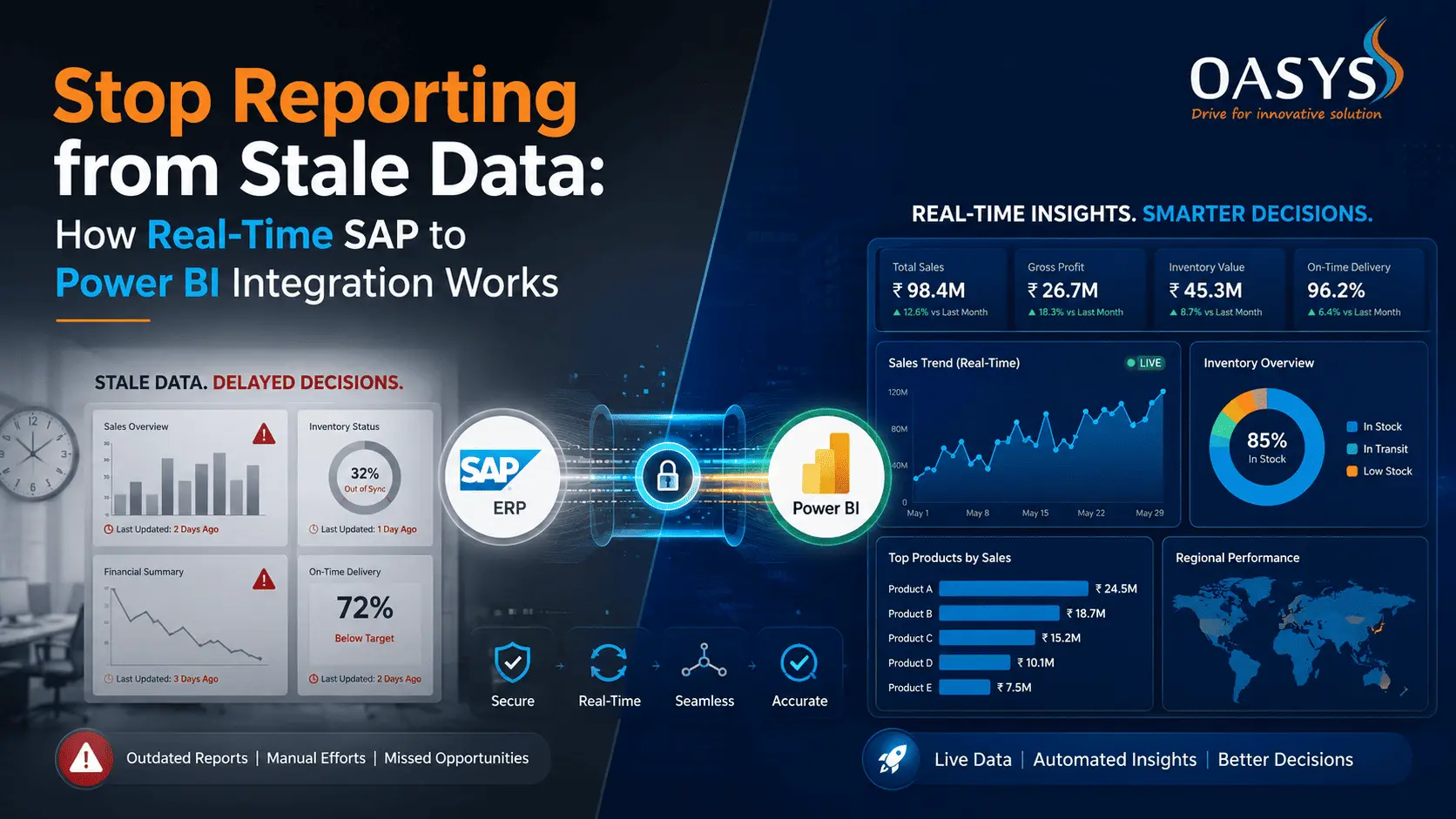
Stop Reporting from Stale Data: How Real-Time SAP to Power BI Integration Works
Business decisions move fast. Market conditions shift hourly. Operational problems need attention within minutes, not days. Yet most organizations are making decisions on data that's anywhere from 24 hours to a month old.
The problem? The gap between where your operational data lives (SAP) and where analysts look for it (Power BI). By the time last night's transactions get cleaned, formatted, and loaded into your dashboard, you're already behind.[Sources: edureka]
Real-time SAP to Power BI integration isn't theoretical anymore. It's implementable, sustainable, and increasingly expected by organizations that move quickly. Here's what's actually possible, how it works, and what you need to get there.
The Cost of Stale Data in Business Intelligence
Why Monthly Reports Are Costing You Decisions
Think about how your organization currently sees critical metrics. Finance closes the books, data lands in the warehouse, analysts build reports, and by the time insights reach decision-makers, it's already next week.
This delay creates real problems:
- A spike in customer churn isn't caught until the monthly board meeting
- An inventory shortage in a regional warehouse sits unaddressed for days because the data doesn't surface until the weekly operations review
- A pricing error affecting thousands of transactions keeps running until the next automated report runs
The impact adds up quickly. A financial services company loses accuracy on intraday trading signals. A retailer can't react to demand shifts in hours. A manufacturing operation discovers production inefficiencies after thousands of defective units have already been produced.
Most organizations accept this lag as inevitable. It's not.
The Real-Time Advantage for Operations Teams
Real-time data changes how teams respond to problems. When a sales manager sees that their highest-value customer hasn't placed an order in three days (right now, not tomorrow), they can reach out today. When operations sees that a production line's downtime is trending upward (within minutes, not in next week's report), they can troubleshoot before problems cascade. [Sources: scholar9]
Finance teams can reconcile discrepancies as they occur. Supply chain teams can react to delivery delays in hours instead of waiting for weekly scorecards. Customer success teams can flag at-risk accounts before quarterly reviews.
The business case isn't about perfection or millisecond precision. It's about cutting decision latency from days to hours or minutes. That window is where competitive advantage lives.
Where the Bottleneck Actually Happens
Most organizations assume the problem is with Power BI. It's not. Power BI can refresh in minutes if the data is available.
The bottleneck is between SAP and Power BI.
SAP holds transactional truth. Every order, invoice, shipment, and material movement lives there. But getting that data out of SAP reliably, without disrupting production systems, is where most integration projects stumble. Traditional approaches batch-extract data once or twice daily. The data lands in a staging area, gets processed, transformed, and finally loaded into Power BI.[ Sources: edureka]
Each step adds latency. Each step is also where things can break.
Understanding the SAP-to-Power BI Data Gap
How Traditional Integration Works (and Why It Lags)
The conventional ETL pipeline looks like this:
- Extract from SAP (usually once or twice daily)
- Land in staging or data lake
- Transform and cleanse
- Load into Power BI data model
- Refresh Power BI dashboards
This works fine for historical analysis—month-over-month trends, quarterly comparisons, annual forecasts. But if you're waiting for transactional intelligence (what's happening right now), you're watching yesterday's movie.
The delay compounds at each stage. SAP extraction takes time because your production system can't afford to be hammered by data exports. Data transformation is complex because SAP data is messy and interconnected. Power BI refresh cycles are scheduled to avoid overloading infrastructure.[edureka]
By design, you're always a few hours behind reality.
The Latency Problem in Layered Data Architecture
Most enterprise data architectures are built like this:
- Operational systems (SAP) run the business
- Data lakes or data warehouses store historical copies
- BI tools query those copies
This layering creates distance between the source and the insight. More layers mean more latency. More transformation steps mean more places where data can diverge from the source of truth.
If your SAP instance updates inventory at 2:47 PM, and that data needs to pass through an ETL tool, a staging database, a data warehouse, and then a Power BI refresh cycle, you might not see it in a dashboard until 3:30 PM or later. For operational decisions, that's an eternity.
Real-time integration collapses this architecture. Instead of layered batches, you're streaming changes as they happen.[scholar9]
Why Real-Time Matters for Different Departments
Different teams feel stale data differently:
|
Department |
Impact of Stale Data |
|
Finance & Accounting |
Month-end close requires accuracy, but period-to-date reviews need current numbers to catch errors. A revenue posting error found on day 25 of a 30-day month requires rework and urgency. Caught on day 3, it's a simple fix |
|
Sales Operations |
Pipeline accuracy decays hourly. A deal that closes at 5 PM isn't reflected in forecasts until tomorrow's dashboard refresh. Forecasting accuracy matters when you're closing the quarter |
|
Supply Chain |
Inventory imbalances compound quickly. Demand shifts hour to hour. A warehouse out of stock should trigger rebalancing immediately, not when next week's inventory report runs. |
|
Operations & Manufacturing |
Downtime is expensive. A production line running inefficiently is losing money every minute. Real-time visibility lets teams intervene before minor problems become major ones |
The department doesn't matter. If your team makes decisions more than once a day, stale data costs you.
[Sources: abbacustechnologies]
Real-Time Integration Approaches: What Actually Works
Real-time SAP to Power BI integration isn't one thing. It's several approaches, each suited to different circumstances, complexity levels, and organizational constraints.
Change Data Capture (CDC) Method
Change Data Capture reads the transaction log of SAP. Every time data changes in SAP, CDC captures that change and streams it forward.
How it works:
- CDC tools (like Attunity, Striim, or Debezium) monitor SAP's transaction logs
- When a transaction completes, the tool captures what changed
- Changes are pushed to an intermediary (Kafka, Azure Event Hub, or similar)
- Power BI connects to that stream and updates in near-real-time
Advantage: This is genuinely real-time. Latency is measured in seconds, not hours. [Sources: scholar9]
Challenge: CDC requires technical expertise to set up and maintain. You need people who understand SAP table structures, database administration, and streaming architecture. The upfront effort is significant.
Best for: Organizations with dedicated IT teams, high-volume transactional systems, and scenarios where sub-minute latency matters.
API-Based Direct Connections
SAP exposes APIs (through OData or REST interfaces) that Power BI can query directly. Power BI refreshes call these APIs and pull the latest data. [Sources: abbacustechnologies]
How it works:
- SAP exposes relevant data through APIs (built-in or custom)
- Power BI DirectQuery or frequent refresh connects to those APIs
- Each time a dashboard loads, it fetches current data from SAP
- Alternatively, scheduled refreshes happen every 15 minutes instead of daily
Advantage: Simpler to implement than CDC. Easier to maintain. Works well for specific datasets (not the entire database). [Sources: edureka]
Challenge: Direct queries against SAP can impact system performance. API design needs to be efficient. Scaling to hundreds of concurrent users is tricky. [Sources: edureka]
Best for: Organizations with smaller datasets, specific critical metrics (not everything), and teams that can accept 10-30 minute latency.
Hybrid Approaches for Complex Environments
Most real implementations aren't purely one method. Instead, they combine approaches:
- Use APIs for critical real-time metrics (sales today, inventory on hand, customer balances)
- Use CDC or frequent batch refresh for operational data that's less time-sensitive
- Build data lakes for historical analysis and trending
- Layer BI tools to show different freshness levels based on use case
This hybrid approach balances real-time visibility, system performance, maintenance burden, and cost.
Example: A retailer might use API-based real-time connections for store sales and inventory dashboards (updated every 5 minutes), while using nightly batch loads for trend analysis and forecasting. A manufacturer might stream production metrics in real-time while batching financial data daily.[ Sources: abbacustechnologies]
Building Real-Time Dashboards in Power BI
Having real-time data is only half the problem. You also need to query it, model it, and present it without killing performance.
Incremental Refresh vs. Full Refresh
Power BI offers incremental refresh, which updates only the data that's changed since the last refresh, rather than reloading everything.[ Sources: community.fabric.microsoft]
This is critical at scale. If you're syncing millions of transactional records, a full refresh every 15 minutes will crush your infrastructure. An incremental refresh that only pulls the last 15 minutes of changes is drastically more efficient.
Setup: Partition your Power BI data model by date, then tell Power BI to refresh only the most recent partitions. Older data stays unchanged.
Benefit: Faster refresh cycles, less network traffic, lower cost.
Trade-off: Requires more careful data modeling upfront.
Structuring Data Models for Speed
Real-time dashboards fail when data models are poorly structured.
Common mistakes:
- Including every column from every SAP table (creates massive, slow-moving datasets)
- Building complex calculated columns that recalculate on every refresh (expensive at scale)
- Using row-level security poorly (every refresh now requires filtering for every user)
- Joining to lookup tables without aggregating first (exponential growth in rows)
Proper structure:
- Separate fact tables (transactions, events) from dimension tables (customers, products, locations)
- Pre-aggregate where possible (don't push aggregation work to the dashboard layer)
- Keep calculated columns minimal, use DAX measures instead (measures don't recalculate on refresh)
- Use columnar compression to reduce data size
This is where SAP experience matters. Teams that know how SAP data is structured can build Power BI models that work with SAP's grain and logic, rather than fighting it[Sources: abbacustechnologies]
Performance Tuning for Large-Scale Real-Time Data
Real-time data at scale requires attention:
|
Technique |
Why It Matters |
|
Compression |
Power BI's columnar engine is efficient, but structure matters. A poorly designed model can be 10x larger than necessary |
|
Aggregation |
Pre-aggregate data where it makes sense. Store daily summaries instead of raw records when the raw records aren't needed |
|
Incremental partitioning |
Combine with aggregation. Store raw transactions for the last 30 days, then daily summaries for older data |
|
Query optimization |
Monitor which visuals are slow. Optimize the queries behind them |
|
Capacity planning |
Real-time refresh is more demanding than daily refresh. If you're refreshing every 15 minutes, you need more capacity than if you're refreshing once daily |
The goal isn't perfection. It's acceptable performance at acceptable cost.
How Organizations Are Addressing This Challenge
Real-time SAP integration isn't new anymore. Mature organizations have deployed it. Here's what they've learned.
Implementation Considerations
-
Start with critical metrics, not everything
The temptation is to push all of SAP to Power BI in real-time. Don't. Pick the 3-5 datasets that actually need real-time visibility. Build those first. Expand later. [Sources: abbacustechnologies]
A financial services firm might start with daily revenue and top customer account balances. A retailer might start with point-of-sale transactions and inventory on hand. A manufacturer might start with production run status and downtime events.
Limiting scope reduces complexity, costs, and risk.
-
Plan for SAP load
Direct real-time queries against production SAP systems are dangerous. SAP wasn't built for continuous analytical queries. Every time your dashboard refreshes or a user opens a report, there's a query hitting SAP. [ Sources: edureka]
Solutions:
- Use read-only replicas of SAP data (SAP Landscape Transformation Replication Server, or LTR, handles this)
- Implement query throttling and caching so multiple users don't hammer SAP with the same query
- Consider extracting to an intermediate data engine (like SAP Data Warehouse Cloud) that's designed for analytical queries [Sources: edureka]
-
Define what "real-time" actually means
Real-time to a financial trader means milliseconds. Real-time to a finance manager might mean within the hour. Real-time to a supply chain planner might mean every 10 minutes.
Define your SLAs before you architect. A system refreshing every 5 minutes is far more complex and expensive than one refreshing every hour. If hourly is sufficient, build for hourly.
[ Sources: community.fabric.microsoft]
-
Invest in data governance from day one
Real-time data amplifies data quality problems. If stale data is wrong, you catch it eventually. If real-time data is wrong, bad decisions compound. Implement validation rules, reconciliation checks, and alerts for data anomalies before they reach dashboards.
[Sources: scholar9]
-
Build monitoring and alerting
Real-time pipelines are dependencies now. When your nightly batch fails, you discover it in the morning. When your real-time pipeline fails, dashboards go blank while people are using them.
Monitor:
- Refresh success rates
- End-to-end latency (time from SAP transaction to dashboard display)
- Data anomalies (sudden spikes, missing data)
- Performance metrics (refresh duration, query response times)
Set up alerts so your team knows when something breaks, not your users.[scholar9]
Common Pitfalls and How to Avoid Them
|
Pitfall |
Fix |
|
Building for real-time that isn't needed. Historical and trend analysis doesn't need sub-hourly freshness. Overbuilding leads to unnecessary cost and complexity |
Use stratified freshness. Real-time for what needs it, hourly for operational data, daily for analytics |
|
Ignoring SAP system load. Aggressive real-time refresh against a production SAP system kills performance for operational users |
Use replicas, caching, and query governance. Don't query production directly |
|
Poor data modeling. A well-structured dimensional model can refresh in 15 minutes. A poorly structured flat file takes hours |
Work with someone who understands both SAP and Power BI. This crossover expertise is worth the investment |
|
No monitoring or alerting. Real-time systems fail silently. A pipeline is suddenly 2 hours behind, and no one notices until decisions are made on stale data |
Instrument everything. Monitor refresh duration, latency, data completeness, and anomalies. Alert on thresholds |
|
Forgetting about support and maintenance. Real-time pipelines require ongoing care |
Budget for dedicated support. Real-time isn't set-and-forget |
Making Real-Time SAP Integration Work for Your Organization
Real-time is achievable. It's also non-trivial. Here's how to evaluate whether it makes sense for you, and what comes next.
Assessing Your Current Architecture
Ask yourself:
- What decisions are you making too slowly because data is stale? Be specific. Not vague. "Sales visibility" is too vague. "We can't see daily sales by customer until the next day, so we miss churn signals until the weekly review" is specific
- What's the cost of that delay? Estimated revenue impact, risk exposure, or operational friction. If the cost is low, real-time might not be worth it
- How big is your SAP system? Larger systems have more data, which makes real-time more complex and expensive.
- Do you have the technical depth in-house? Real-time requires people who understand SAP internals, databases, and data engineering. If you don't have that expertise, factor in the cost of building it or outsourcing
- What are you using for BI today? If you're already on Power BI, the integration cost is lower. If you're elsewhere, you have a migration project on top of the integration
[Source: abbacustechnologies]
Planning the Right Integration Approach
Based on your assessment, map to an approach:
|
Situation |
Recommended Approach |
|
Latency of hours is acceptable, complexity is high |
Start with API-based integration on critical datasets. Limit scope, limit cost, learn before expanding [edureka] |
|
Need sub-hour latency and have strong technical teams |
Explore CDC or hybrid approaches. More complex, but payoff is greater [scholar9] |
|
Multiple systems (not just SAP) need real-time visibility |
Consider a central data platform (SAP Data Warehouse Cloud, Synapse, Snowflake) that ingests from all sources and serves Power BI [scholar9] |
|
Mid-transformation and SAP is being replaced or upgraded |
Real-time integration might be temporary. Build flexibility so you're not locked into one approach |
Once you've chosen a direction, the next steps are:
- Assign a project lead
- Involve SAP, Power BI, and data architecture expertise
- Pick one critical use case to pilot
- Plan for 3-6 months of build and refinement
- Measure the business impact (faster decisions, cost savings, reduced errors) before scaling to other use cases[Source: abbacustechnologies]
Handling the Implementation: How OASYS Supports Similar Initiatives
Organizations solving this problem don't start with blank whiteboards. They're navigating choices between SAP replication strategies, data platform architecture, and integration tooling. They're weighing CDC complexity against API simplicity. They're building data models that don't slow down the ERP system while still delivering real-time visibility.
This is where SAP Solutions and ERP Integration expertise becomes critical.
Teams that have built real-time SAP integrations understand:
- How to configure SAP systems for real-time data extraction without killing transactional performance [Source: edureka]
- How to structure data pipelines that scale with transaction volume [Source: abbacustechnologies]
- How to design Power BI models that work with SAP's data architecture, not against it. Source: abbacustechnologies
- How to avoid the common pitfalls that derail projects (overscoping, poor performance, data quality issues)[abbacustechnologies]
If you're early in evaluation, expert guidance on architecture and approach can save months of rework. If you're already in build, hands-on implementation support reduces risk and accelerates delivery.